
Run the service
Hands-free and following the preacher
Let PulpitCue put verses up as they are announced, follow the reading and obey spoken requests.
By default every suggestion waits for you. Hands-free is an optional mode where PulpitCue puts a verse on screen as soon as it is confirmed, follows the reader through the passage, and obeys simple spoken requests such as “next verse”. It is built to be cautious: it would rather wait than show the wrong thing.
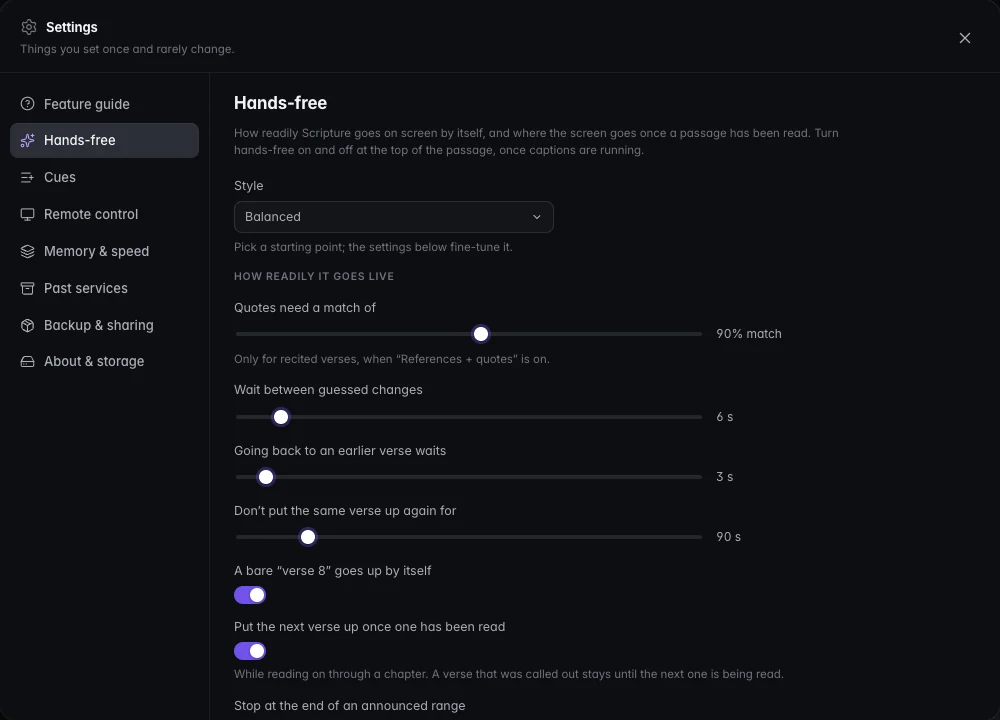 Settings → Hands-free: pick a style, then fine-tune.
Turning it on
The Hands-free switch is at the top of the passage in the Bible workspace, next to Auto-follow. Once it is on, a menu beside it chooses what may go live by itself: References (verses the preacher names) or + quotes (also verses recited word for word). The gear opens the fine-tuning page shown above.
Good to know
Hands-free acts on what it hears, so the switch is unavailable until captions are running. It can always be switched off.
What it does
Opens the passage when it is announced
When the preacher names a verse, it goes on screen without waiting for the end of the sentence. These all work, including numbers spoken aloud:
- “John 3:16” · “John chapter three verse sixteen”
- “Mark chapter 5 verse 1”
- “Hebrews 12 from verse 11”
- A bare “verse 8” when a chapter is already open
A reference counts once a word follows it, or when two drafts in a row agree, so “verse 1” is not put up while it might still become “verse 16”. A chapter and verse with no book, or a reference said earlier, is only offered as a cue.
Understands ranges
“Verses 1 to 5”, “1 through 5”, “16 and 17” and long readings such as “Genesis 1, 1 to 31” go up as one passage, slide by slide. While a range is still being said, nothing goes up, so verse 1 is never shown alone and then followed on to verse 6. Once a range is up, the screen stops at its last verse however far the reader carries on.
Follows the reading
While someone reads, the screen stays on the verse being read. The newest words decide, so a verse is recognised a few words in, and when a verse ends the next is put up ahead of the reader (never past a range that was announced). It only moves backwards, or a long way forwards, after a near word-for-word match seen twice, so commentary, repeated phrases and refrains do not make the screen jump around.
A verse that was called out (“John 3:16”) stays up until the next one is clearly being read, never just because the verse ended. A preacher who stops to explain it keeps it on screen.
Obeys spoken requests
The preacher can ask the media desk directly:
| They say | PulpitCue does |
|---|---|
| “Next verse” · “next slide” · “Next.” | Steps forward a verse (inside a range when one is up), or a slide when a presentation is on screen. |
| “Go back one verse” · “back to the previous slide” · “Go back.” | Steps back. |
| “Read it again” · “from the top” | Returns to the first slide of the passage. |
| “Clear the screen” | Clears it. |
Each request is obeyed once, however many drafts repeat it. Ordinary preaching such as “as we saw in the previous verse” or “next week” is not a request. If you do not want this, turn off Obey spoken requests in the Hands-free settings.
Tidies up afterwards
Under When the passage has been read choose what happens once a passage has been read to its end and has been quiet for a set time: Stay on the verse, Clear the screen, Show the logo or Show my default slides (pick a deck). You can also go back if a verse was put up and never read aloud. This applies while Hands-free or Auto-follow is on.
Styles
In Settings → Hands-free, Style picks a starting point for how readily things go live, and the sliders below it fine-tune the result (the style then reads Custom).
| Style | Meaning |
|---|---|
| Cautious | Only when certain. |
| Balanced | A sensible middle. The default. |
| Eager | Keeps up with the reading. |
The settings
- Quotes need a match of… how close a quoted verse must be to go live. Quotations go live only at the quotes level, after a short pause, and never behind the verse already on screen while a passage is being read.
- Wait between guessed changes. The minimum gap between automatic changes.
- Going back to an earlier verse waits… a short time, so a slip does not move the screen backwards.
- Don’t put the same verse up again for… stops a verse flickering back after you cleared it.
- A bare “verse 8” goes up by itself.
- Put the next verse up once one has been read.
- Stop at the end of an announced range.
- Obey spoken requests.
Staying in control
- The operator can always override: click any verse, press
Escto clear, or switch Hands-free off. - Use Back (
B) if the screen moved somewhere you did not want. - Quotes and retold stories are only ever suggestions unless you choose the quotes level.
Before you rely on it
Recognition is English only and works from a machine transcript, so loud music, echo or a quiet microphone will make it less reliable. Watch the first few services with it on before you step back. Keep a hand on
Esc.
Still stuck?
Tell us what you were trying to do and we will help.